iTasker vs OK, Bob!: Telegram task bots for a small team

Your team discusses work in Telegram, yet assignments still disappear in the conversation. Both iTasker and OK, Bob! turn messages into tasks. The difference matters when you need to see how a whole project is moving, not just capture another request.
This comparison is written by the iTasker team. Features and plans were checked against official sources on October 20, 2026. It is a feature comparison, not an independent ranking or a performance benchmark.
iTasker and OK, Bob! at a glance
| App | Free team allowance | Work overview |
|---|---|---|
| iTasker | 2 projects, up to 5 members each | Lists, status-based Kanban and a calendar in the web app |
| OK, Bob! | Up to 3 active users in the owner's groups | Boards by date and assignee; status-tag boards on Business |
iTasker's limits appear on its pricing page. OK, Bob! defines active users by their task activity during the billing period; see its plan terms. A chat's total membership is not the same as its active-user count.
Where iTasker fits a small team better
Take a five-person editorial team with two projects: content and promotion. Requests arrive in chat, but the weekly meeting needs a clear picture of work in progress and work awaiting review.
That team fits within iTasker's free project-member allowance. People can use Telegram on their phones and open the web board at a computer. The manager does not have to assemble a progress report from separate chat replies.
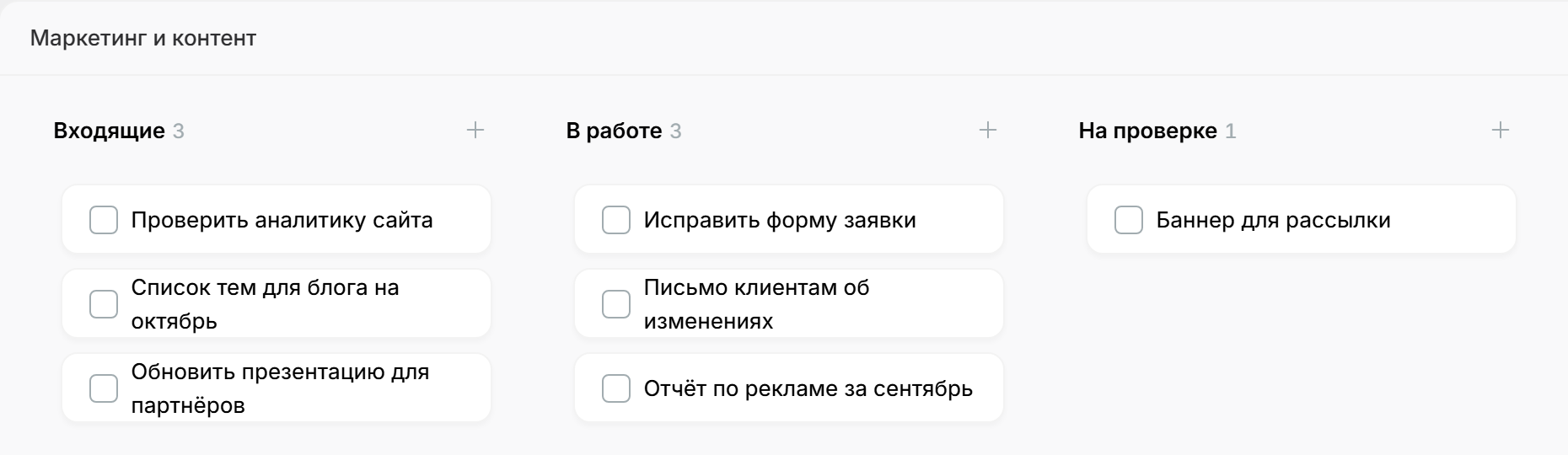
A real iTasker screen from our Kanban guide. It shows the web app, not the Telegram bot. The captured interface is in Russian.
If you need multiple assignees on one task, more project members or Google Calendar sync for project tasks, check the paid plans. A free calendar view in the web app does not mean every form of external calendar sync is free.
When OK, Bob! is worth considering
OK, Bob! suits people who like managing assignments with chat messages. It supports voice input, recurring tasks and reminders, with a mini app and browser access. Its official introduction covers personal and group workflows.
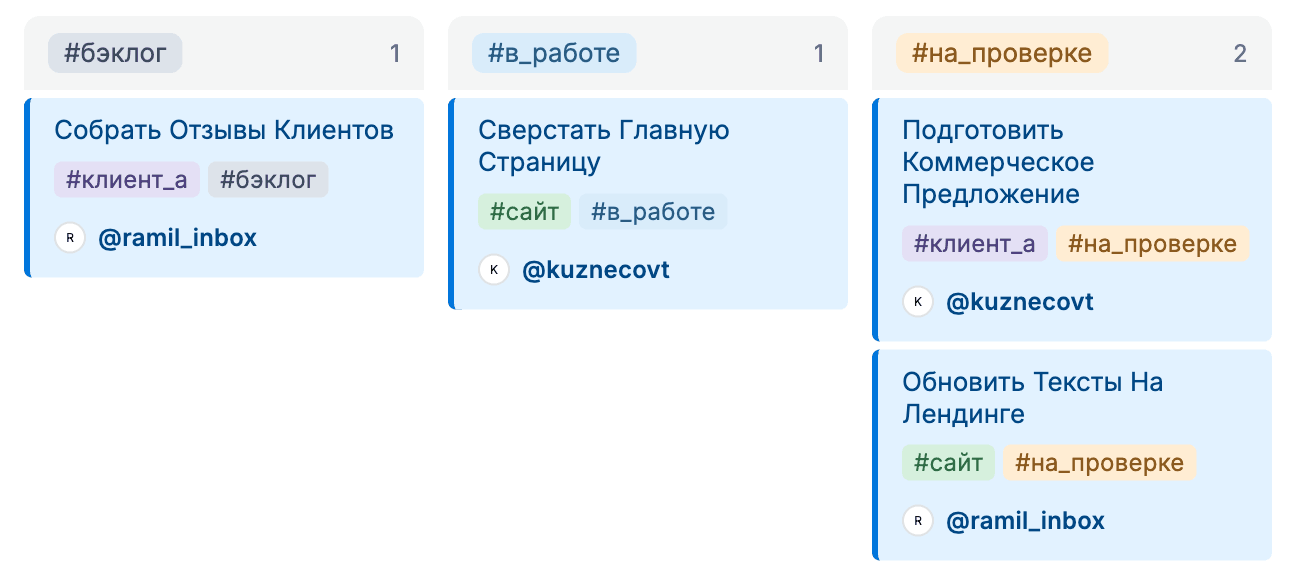
An official OK, Bob! documentation screenshot, in Russian. This status-tag board is a Business feature, not a free-plan feature.
Both products offer voice and AI workflows. “Turns a message into a task” is therefore a poor deciding factor on its own. Check what happens next: finding the task, updating its status and reviewing the team's progress.
For a team specifically looking for a free browser-based status board, iTasker is the more practical starting point. If your team already likes OK, Bob!'s commands and its chosen plan meets your needs, there is no reason to switch for the name alone.
Make the choice during one working week
Our recommendation for this starting point is iTasker: a useful free member allowance and a visual status overview without buying a Business plan. You can start with the iTasker bot.
Keep the first board small. The goal is to make the current work visible, not to design a complicated management system.










'/%3e%3cg%20transform='translate(7.5%209.35)%20scale(0.0644)'%20fill='white'%3e%3cpath%20d='M296.63%2067.21C317.501%2046.2949%20351.375%2046.2591%20372.29%2067.1299C393.205%2088.0008%20393.241%20121.875%20372.37%20142.79L200.735%20314.79C190.699%20324.848%20177.074%20330.5%20162.865%20330.5C148.656%20330.5%20135.03%20324.848%20124.994%20314.79L15.6297%20205.192C-5.24109%20184.277%20-5.20533%20150.403%2015.7098%20129.532C36.625%20108.662%2070.4991%20108.697%2091.37%20129.612L162.864%20201.259L296.63%2067.21Z'/%3e%3cpath%20d='M221.5%2059.5C221.5%2092.3609%20194.861%20119%20162%20119C129.139%20119%20102.5%2092.3609%20102.5%2059.5C102.5%2026.6391%20129.139%200%20162%200C194.861%200%20221.5%2026.6391%20221.5%2059.5Z'/%3e%3c/g%3e%3cdefs%3e%3clinearGradient%20id='paint0_linear_logo_mark'%20x1='20'%20y1='0'%20x2='20'%20y2='40'%20gradientUnits='userSpaceOnUse'%3e%3cstop%20stop-color='%2379C9FF'/%3e%3cstop%20offset='1'%20stop-color='%23007AFF'/%3e%3c/linearGradient%3e%3c/defs%3e%3c/svg%3e)