Task lists in Telegram: what the built-in checklists can do and why iTasker does more

In July 2025 Telegram added checklists: interactive lists that you can send to any chat. They work well for a shopping list or a short to-do list. Whether they work for real task management is a different question, and this article compares them with iTasker, a task manager that lives inside Telegram.
How Telegram checklists work
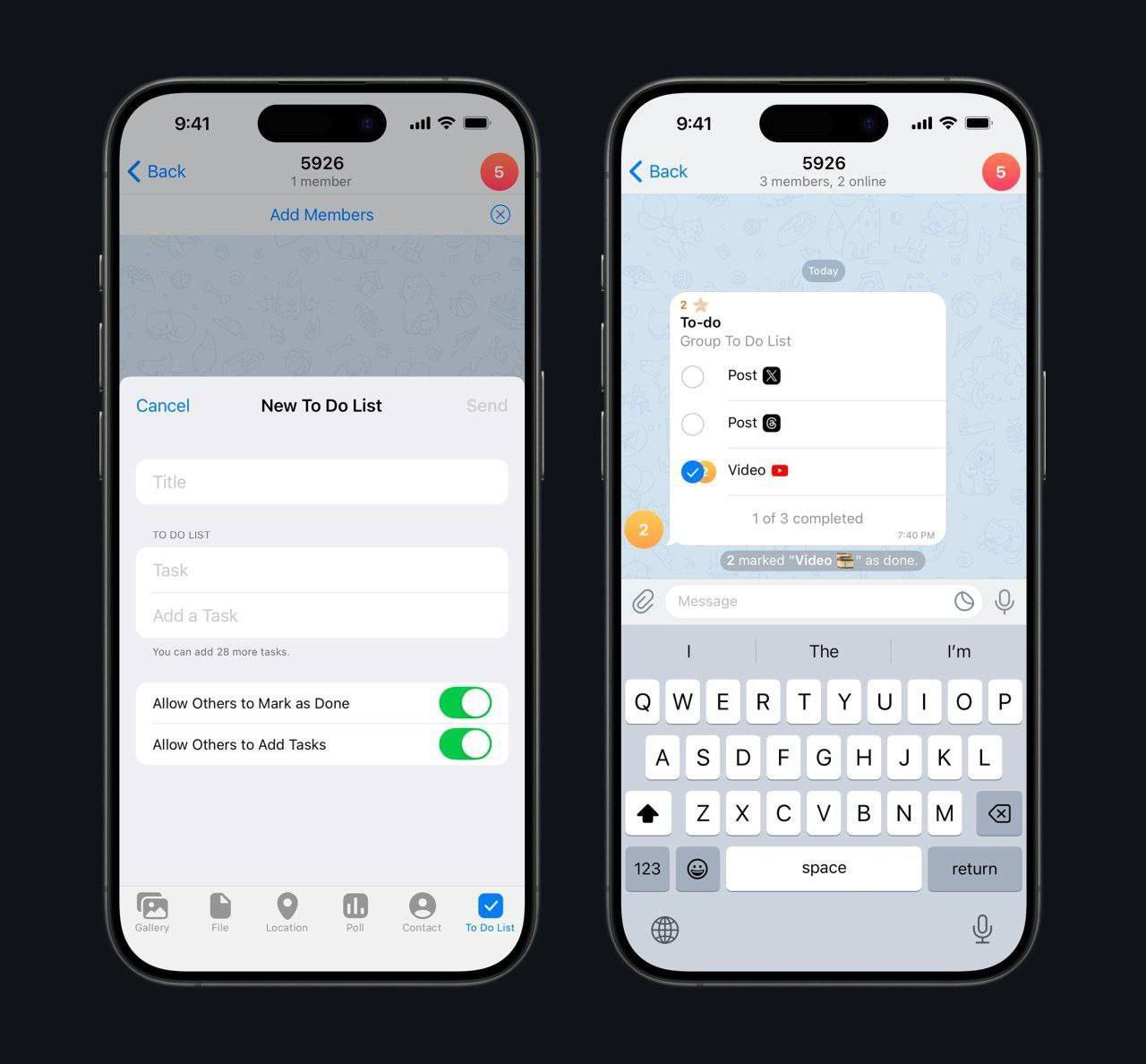
According to Telegram's announcement, a checklist can be sent to a private chat, a group or Saved Messages. On a phone, open the attachment menu and tap "Checklist". Creating one requires Telegram Premium, and the creator decides whether other participants can tick items and add their own. The media reports on the release put the limit at 28 items per list. People without Premium see the list but, as those reports note, cannot tick items.
What's missing is everything that turns a list into task management: due dates, reminders, filters, a history of completions. A checklist lives in one chat and doesn't grow into a project.
Without Premium
You're left with improvised methods: a separate message for each task that you delete when it's done, or one pinned message where you mark items ✅ and ❌ by hand. Both work for a week or two, and then the list gets buried in the chat.
Where iTasker fits
iTasker is a bot with a mini app for tasks and projects inside Telegram. It doesn't require Premium, and the checklist features it lacks are its starting point:
- You can create a task with one message, for example "Buy coffee tomorrow at 10:00", and the bot picks up the date and time.
- Tasks have due dates and reminders. The number of tasks with active reminders depends on the plan.
- In a shared project you can assign a task to colleagues, and in a group you can turn any message into a task by replying with
/new. - Statuses, tags, sorting and search keep the list manageable, and the web version shows completion statistics.
- Recurring tasks come back on their own.
How to start
- Find @iTasker_bot in Telegram and tap "Start".
- Create a task in either of two ways: in the mini app, for personal and shared projects, or with the
/newcommand, for example/new Buy coffee tomorrow at 10:00, in a private chat with the bot or in a group linked to a project.
iTasker has a free plan with limits on the number of tasks, active reminders and project participants. If you only need a short list, a Telegram checklist is enough; if you need dates, reminders and a shared board, that's where iTasker starts to pay off.












'/%3e%3cg%20transform='translate(7.5%209.35)%20scale(0.0644)'%20fill='white'%3e%3cpath%20d='M296.63%2067.21C317.501%2046.2949%20351.375%2046.2591%20372.29%2067.1299C393.205%2088.0008%20393.241%20121.875%20372.37%20142.79L200.735%20314.79C190.699%20324.848%20177.074%20330.5%20162.865%20330.5C148.656%20330.5%20135.03%20324.848%20124.994%20314.79L15.6297%20205.192C-5.24109%20184.277%20-5.20533%20150.403%2015.7098%20129.532C36.625%20108.662%2070.4991%20108.697%2091.37%20129.612L162.864%20201.259L296.63%2067.21Z'/%3e%3cpath%20d='M221.5%2059.5C221.5%2092.3609%20194.861%20119%20162%20119C129.139%20119%20102.5%2092.3609%20102.5%2059.5C102.5%2026.6391%20129.139%200%20162%200C194.861%200%20221.5%2026.6391%20221.5%2059.5Z'/%3e%3c/g%3e%3cdefs%3e%3clinearGradient%20id='paint0_linear_logo_mark'%20x1='20'%20y1='0'%20x2='20'%20y2='40'%20gradientUnits='userSpaceOnUse'%3e%3cstop%20stop-color='%2379C9FF'/%3e%3cstop%20offset='1'%20stop-color='%23007AFF'/%3e%3c/linearGradient%3e%3c/defs%3e%3c/svg%3e)